New Release: Replay Media Catcher 3. Download Streaming Video and Audio from more sites, automatically name files and more. Rip FLV video and MP3 audio streams from Flash player and more...

 
All Streaming Media.Com » FAQ » Recording media stream » How to record/download/capture/save Macromedia/Adobe Flash .FLV video RTMP stream from embedded player
 Google Custom Search
 Streaming media recording
  • Record streaming VIDEO
  • Record streaming AUDIO
  • Record WEBCAM video/audio
  • Record P2P TV programs
  • FIND hidden stream URLs
  • Streaming media recording FAQ
  •  
  • REPAIR broken media
  • CONVERT audio and video files
  • TAG and rename media files
  • Stream BROADCAST software
  • BURN cd,dvd,hd dvd,blu-ray

  • Streaming media online
  • Downloadable media online

  • Streaming media FAQ
  • Streaming media FAQ (archive)
  • FORUM - Ask your question
  • The most POPULAR stream recording software (free download):

    Other RECOMMENDED software and services:

    How to record/download/capture/save Macromedia/Adobe Flash .FLV video RTMP stream from embedded player

    Getting/recording/capturing/saving RTMP video stream from Flash browser plugin to hard disk.

    How to download/rip .FLV video and .MP3 audio streams through RTMP and HTTP protocols with Replay Media Catcher (recommended method)

    Replay Media Catcher is one of a few stream rippers/recorders that can download Flash .FLV Video and .MP3 Audio from Macromedia/Adobe Flash browser plug-in. Replay Media Catcher is very easy to use:

    1. Open Replay Media Catcher and click "Start Recording".
    2. Navigate to a page with your video or audio stream and play it in the embedded flash player.
    3. All .FLV flash video and .MP3 audio files streamed through the HTTP or RTMP protocol will be saved to hd automatically!

    How to capture .FLV video and MP3 audio stream broadcasted through RTMP and HTTP protocols with Bit Recorder (recommended method)

    Bit Recorder can capture Flash .FLV Video and .MP3 audio from Macromedia/Adobe Flash browser plug-in. To capture RTMP or HTTP .FLV video and .MP3 audio from Flash player with Bit Recorder:

    1. Run Bit Recorder
    2. Click the "Options" button. This will bring a new dialog window.
    3. Under "Selected Adapter" Click the "..." button, and select the adapter you use to connect to the Internet. Press "OK" button. Press "Ok" button in to Close the "Options" window.
    4. Click the "Start" button. Bit Recorder will start sniffing the network data packets.
    5. Open a web page with flash video player on it and play the video or audio stream.
    6. Bit Recorder starts capturing flash video and MP3 audio streaming automatically when it finds the stream URL.
    Please note that Bit Recorder captures packets coming to your flash player. So you should fully play an audio/video stream that you want to capture.

    How to download/rip streamable .FLV video through RTMP and HTTP protocols with Orbit Downloader

    Orbit Downloader can download Flash .FLV Video from Macromedia/Adobe Flash browser plug-in. And its URL finder called Grab++ can find RTMP stream URLs.

    To download RTMP flash .FLV video with Orbit Downloader:

    1. Run Orbit Downloader
    2. Start Grab++
    3. Start your web-browser and navigate to a web-page with an embedded Flash player
    4. Play your streaming video in the embedded Flash player
    5. In Grab++ find the FLV video that you wanna download and mark the corresponding checkbox.
    6. Click the "Download..." button.
    7. The "Create new download" dialog will appear. Hit the OK button to start downloading.

    How to download/rip streamable .FLV video streams through RTMP and HTTP protocols with Rip Tiger

    To download/rip .FLV video stream from Flash Player with Rip Tiger:

    1. Run Rip Tiger
    2. Make sure "Automatic downloading is turned on" (if it is not, click onto the "On/Off" button.
    3. Navigate to a web page with your video or audio stream and play it in the embedded flash player.
    4. All .FLV flash video streamed through the HTTP or RTMP protocol will be downloaded automatically!

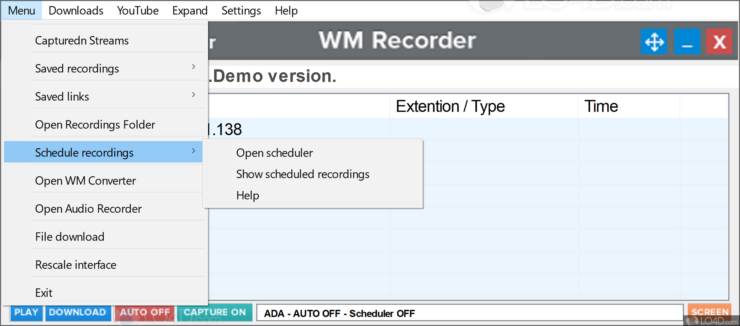
    How to capture streamable .FLV video and .MP3 audio streams through RTMP and HTTP protocols with WM Recorder

    WM Recorder is one of a few stream rippers/recorders that can download Flash .FLV Video and .MP3 Audio from Macromedia/Adobe Flash browser plug-in.:

    1. Run WM Recorder
    2. Click the "Mode" button. This will bring a new dialog window.
    3. Select the ADA or PRO mode. Mark the "Auto recording". Press the "OK" button to close the Mode window.
    4. Navigate to a web page with your video or audio stream and play it in the embedded flash player.
    5. All .FLV flash video and .MP3 audio files streamed through the HTTP or RTMP protocol will be downloaded automatically!
    Please note that RTMP stream recording of WM Recorder is at an early stage. WM Recorder 12.1 can't download live RTMP streams and RTMP streams broadcasted through HTTP.

    How to capture .MP3 audio streams through RTMP and HTTP from MySpace

    To download RTMP protocol MP3 audio streams from MySpace you may use MySpace MP3 Gopher, Replay Media Catcher, Bit Recorder. Unlike Replay Media Catcher and Bit Recorder, MySpace MP3 Gopher can record audio streams from MySpace only.


    Related Flash video recording links:


      Copyright © All-Streaming-Media.Com, 2003-08   Feedback  |  Suggest a link  |  Report error   Disclaimer   Link to us  
    Note: Streaming audio/video recorders are not intended for use in circumventing copy protection mechanisms or for making illegal copies of copyrighted content. Please respect the rights of the content owners when recording.